Today we're shipping a pre-built Shopify data source for Knock. With a few clicks, you can connect events from your Shopify store to Knock and use them to identify customers and trigger workflows. No glue code required.
Why Shopify + Knock
Shopify emits a rich stream of webhook events for everything that happens in a store: orders placed, customers created, fulfillments updated, refunds issued, and more. These are the moments great commerce brands share with customers.
The Shopify source enables you to:
- Trigger transactional notifications from store events. Send order confirmations, shipping updates, and refund receipts the moment Shopify reports the change, across email, SMS, push, and in-app channels.
- Keep your Knock recipients in sync with Shopify customers. Identify customers and update their traits when they're created or updated in Shopify, so every downstream message reaches the right person with the right data.
- Skip the integration work. Knock verifies every incoming payload, sorts events by topic, and deduplicates retries automatically, so you can focus on the notifications you want to send instead of plumbing.
Pre-configured events
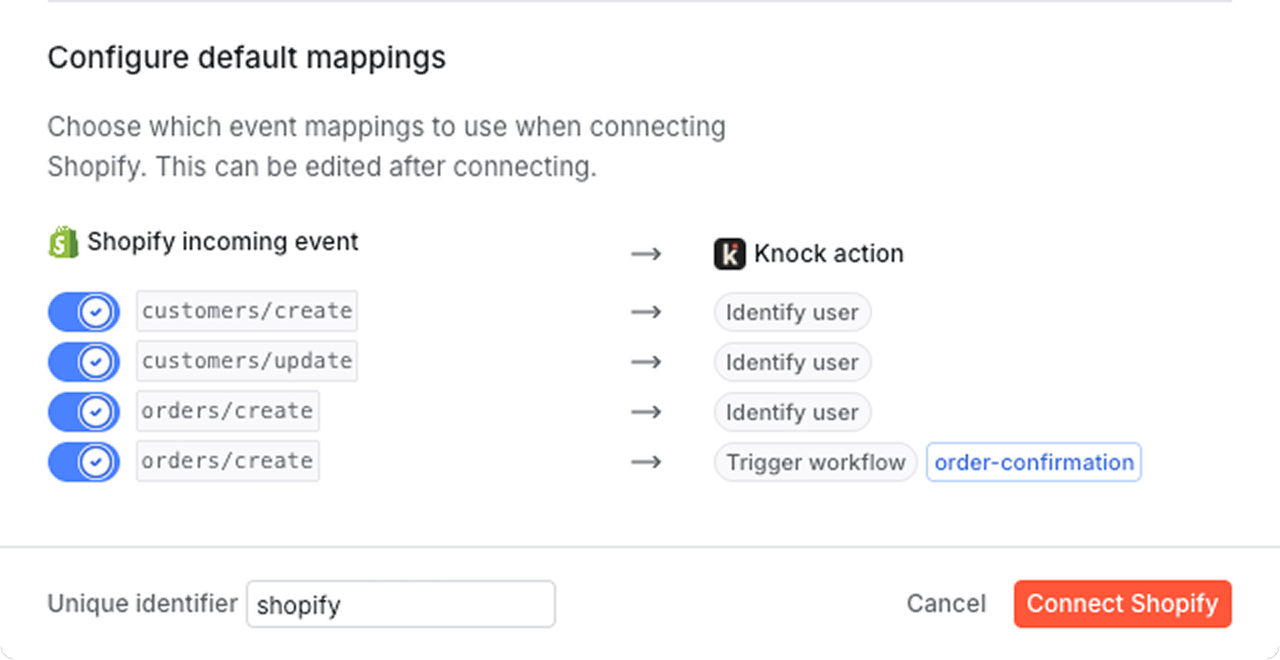
The Shopify source ships with default action mappings for the events commerce teams reach for first:
customers/create— identify the user in Knock.customers/update— identify the user in Knock.orders/create— identify the order's customer in Knock, then trigger anorder-confirmationworkflow with that customer as the recipient.
Knock can ingest any Shopify webhook topic, so you can extend the defaults with mappings for the rest of the customer and order lifecycle:
orders/paid— trigger apayment-receivedworkflow.orders/fulfilled— trigger anorder-shippedworkflow.orders/cancelled— trigger anorder-cancelledworkflow.customers/delete— delete the user in Knock.
See the pre-configured events section of our docs for the full list and recommended actions.
Get started
The Shopify data source is available today for all Knock customers. Head to "Platform > Sources" in the dashboard to connect your store, or read more in our documentation.