


Build
Set your goals, and Knock agents identify, build, and ship the customer journeys to hit them.
Ship lifecycle and transactional messaging from your favorite agent. Start with a prompt, scale to millions of customers.
Coordinate in-app and out-of-app flows that reach the right users at the right moments. Send dynamic, on-brand messages across email, in-app, push, SMS, and chat.
The New user onboarding workflow in the builder, at Collab.io. An agent step is dragged in from Add a step under the new-user-signup trigger and its prompt is typed: Claude Sonnet 5 writes a welcome line for the recipient that fits their role, into a welcome_line response property. The welcome email uses that line. After a 3 day delay, a branch on Created a project? sends a Day 3 tips email to people who have not created one yet and an in-app feed message to everyone else.
Trigger smart automations that send messages across any channel.
email / in-app / push / SMS / chat
Pick your agent and a use case, then use the prompt to build it.
Your agent
Use case
Your prompt
Prompt
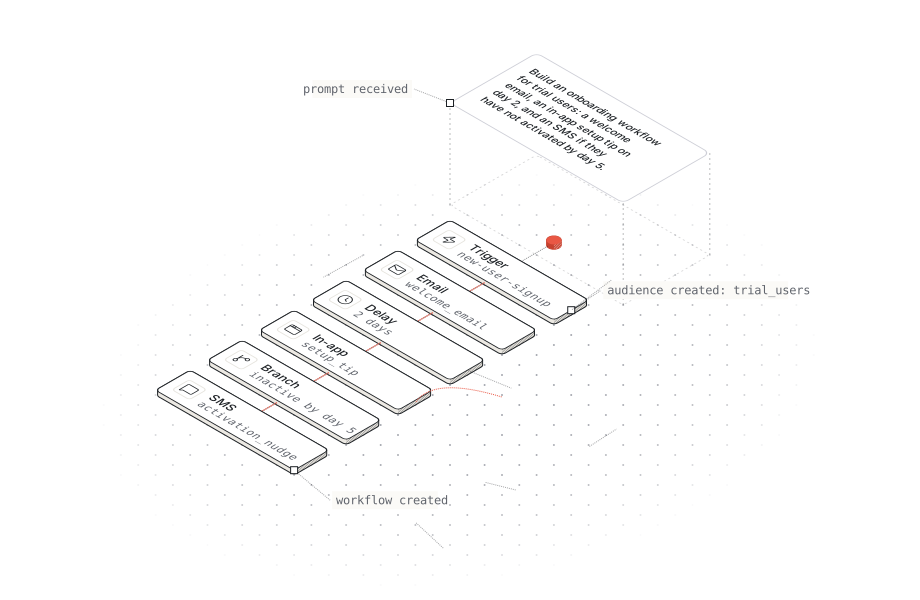
Build an onboarding journey for new signups using Knock. Based on what we're building, create a welcome email on day 0, show an in-app guide on first login, and send a tips email on day 3 if they have not created a project.
Connect your agent to the Knock MCP server at https://mcp.knock.app/mcp, or install the Knock CLI with npm install -g @knocklabs/cli. Then use any prompt below.
Onboarding (Lifecycle)
Build an onboarding journey for new signups using [Knock](https://knock.app). Based on what we're building, create a welcome email on day 0, show an in-app guide on first login, and send a tips email on day 3 if they have not created a project.
claude 'Build an onboarding journey for new signups using [Knock](https://knock.app). Based on what we'\''re building, create a welcome email on day 0, show an in-app guide on first login, and send a tips email on day 3 if they have not created a project. [First make sure to install the Knock CLI.](https://docs.knock.app/cli)'Build an onboarding journey for new signups using [Knock](https://knock.app). Based on what we're building, create a welcome email on day 0, show an in-app guide on first login, and send a tips email on day 3 if they have not created a project. [First make sure to connect the Knock MCP server.](https://docs.knock.app/ai/mcp-server)Build an onboarding journey for new signups using [Knock](https://knock.app). Based on what we're building, create a welcome email on day 0, show an in-app guide on first login, and send a tips email on day 3 if they have not created a project. [First make sure to install the Knock CLI.](https://docs.knock.app/cli)Trial ending (Lifecycle)
When a trial has 3 days left. Based on what we're building, create an email and show an in-app banner with an upgrade button using [Knock](https://knock.app). Stop as soon as the account upgrades.
claude 'When a trial has 3 days left. Based on what we'\''re building, create an email and show an in-app banner with an upgrade button using [Knock](https://knock.app). Stop as soon as the account upgrades. [First make sure to install the Knock CLI.](https://docs.knock.app/cli)'When a trial has 3 days left. Based on what we're building, create an email and show an in-app banner with an upgrade button using [Knock](https://knock.app). Stop as soon as the account upgrades. [First make sure to connect the Knock MCP server.](https://docs.knock.app/ai/mcp-server)When a trial has 3 days left. Based on what we're building, create an email and show an in-app banner with an upgrade button using [Knock](https://knock.app). Stop as soon as the account upgrades. [First make sure to install the Knock CLI.](https://docs.knock.app/cli)Win-back (Lifecycle)
Find users with no activity in the last 30 days. Based on what we're building, create a win-back sequence using [Knock](https://knock.app) across email and push. Stop the sequence as soon as a user comes back.
claude 'Find users with no activity in the last 30 days. Based on what we'\''re building, create a win-back sequence using [Knock](https://knock.app) across email and push. Stop the sequence as soon as a user comes back. [First make sure to install the Knock CLI.](https://docs.knock.app/cli)'Find users with no activity in the last 30 days. Based on what we're building, create a win-back sequence using [Knock](https://knock.app) across email and push. Stop the sequence as soon as a user comes back. [First make sure to connect the Knock MCP server.](https://docs.knock.app/ai/mcp-server)Find users with no activity in the last 30 days. Based on what we're building, create a win-back sequence using [Knock](https://knock.app) across email and push. Stop the sequence as soon as a user comes back. [First make sure to install the Knock CLI.](https://docs.knock.app/cli)NPS survey (Lifecycle)
Based on what we're building, create an NPS survey using [Knock](https://knock.app) that shows in-app 30 days after signup. If a user does not answer within 3 days, send it by email.
claude 'Based on what we'\''re building, create an NPS survey using [Knock](https://knock.app) that shows in-app 30 days after signup. If a user does not answer within 3 days, send it by email. [First make sure to install the Knock CLI.](https://docs.knock.app/cli)'Based on what we're building, create an NPS survey using [Knock](https://knock.app) that shows in-app 30 days after signup. If a user does not answer within 3 days, send it by email. [First make sure to connect the Knock MCP server.](https://docs.knock.app/ai/mcp-server)Based on what we're building, create an NPS survey using [Knock](https://knock.app) that shows in-app 30 days after signup. If a user does not answer within 3 days, send it by email. [First make sure to install the Knock CLI.](https://docs.knock.app/cli)Feature launch (Promotional)
Based on what we're building, create a broadcast using [Knock](https://knock.app) that announces our new reporting feature to all workspace admins, with a matching in-app banner for one week. Use our default email layout.
claude 'Based on what we'\''re building, create a broadcast using [Knock](https://knock.app) that announces our new reporting feature to all workspace admins, with a matching in-app banner for one week. Use our default email layout. [First make sure to install the Knock CLI.](https://docs.knock.app/cli)'Based on what we're building, create a broadcast using [Knock](https://knock.app) that announces our new reporting feature to all workspace admins, with a matching in-app banner for one week. Use our default email layout. [First make sure to connect the Knock MCP server.](https://docs.knock.app/ai/mcp-server)Based on what we're building, create a broadcast using [Knock](https://knock.app) that announces our new reporting feature to all workspace admins, with a matching in-app banner for one week. Use our default email layout. [First make sure to install the Knock CLI.](https://docs.knock.app/cli)Weekly digest (Product)
Based on what we're building, create a weekly digest workflow using [Knock](https://knock.app) that uses an agent step to summarize each user's activity from the past week, then sends it by email every Monday.
claude 'Based on what we'\''re building, create a weekly digest workflow using [Knock](https://knock.app) that uses an agent step to summarize each user'\''s activity from the past week, then sends it by email every Monday. [First make sure to install the Knock CLI.](https://docs.knock.app/cli)'Based on what we're building, create a weekly digest workflow using [Knock](https://knock.app) that uses an agent step to summarize each user's activity from the past week, then sends it by email every Monday. [First make sure to connect the Knock MCP server.](https://docs.knock.app/ai/mcp-server)Based on what we're building, create a weekly digest workflow using [Knock](https://knock.app) that uses an agent step to summarize each user's activity from the past week, then sends it by email every Monday. [First make sure to install the Knock CLI.](https://docs.knock.app/cli)Usage limit (Product)
When an account reaches 80% of its plan limit. Based on what we're building, create an email and an in-app notification using [Knock](https://knock.app) for its admins, and again at 100%.
claude 'When an account reaches 80% of its plan limit. Based on what we'\''re building, create an email and an in-app notification using [Knock](https://knock.app) for its admins, and again at 100%. [First make sure to install the Knock CLI.](https://docs.knock.app/cli)'When an account reaches 80% of its plan limit. Based on what we're building, create an email and an in-app notification using [Knock](https://knock.app) for its admins, and again at 100%. [First make sure to connect the Knock MCP server.](https://docs.knock.app/ai/mcp-server)When an account reaches 80% of its plan limit. Based on what we're building, create an email and an in-app notification using [Knock](https://knock.app) for its admins, and again at 100%. [First make sure to install the Knock CLI.](https://docs.knock.app/cli)Mentions (Transactional)
When someone is mentioned in a comment. Based on what we're building, create an in-app feed message using [Knock](https://knock.app) right away. If it is still unread after an hour, send one email per thread.
claude 'When someone is mentioned in a comment. Based on what we'\''re building, create an in-app feed message using [Knock](https://knock.app) right away. If it is still unread after an hour, send one email per thread. [First make sure to install the Knock CLI.](https://docs.knock.app/cli)'When someone is mentioned in a comment. Based on what we're building, create an in-app feed message using [Knock](https://knock.app) right away. If it is still unread after an hour, send one email per thread. [First make sure to connect the Knock MCP server.](https://docs.knock.app/ai/mcp-server)When someone is mentioned in a comment. Based on what we're building, create an in-app feed message using [Knock](https://knock.app) right away. If it is still unread after an hour, send one email per thread. [First make sure to install the Knock CLI.](https://docs.knock.app/cli)Failed payment (Transactional)
When a payment fails. Based on what we're building, create an email using [Knock](https://knock.app) for the billing contact right away and show an in-app alert to account admins until the payment succeeds.
claude 'When a payment fails. Based on what we'\''re building, create an email using [Knock](https://knock.app) for the billing contact right away and show an in-app alert to account admins until the payment succeeds. [First make sure to install the Knock CLI.](https://docs.knock.app/cli)'When a payment fails. Based on what we're building, create an email using [Knock](https://knock.app) for the billing contact right away and show an in-app alert to account admins until the payment succeeds. [First make sure to connect the Knock MCP server.](https://docs.knock.app/ai/mcp-server)When a payment fails. Based on what we're building, create an email using [Knock](https://knock.app) for the billing contact right away and show an in-app alert to account admins until the payment succeeds. [First make sure to install the Knock CLI.](https://docs.knock.app/cli)Migration (Setup)
Read the templates and journeys in our current messaging tool. Based on what we're building, create workflows, templates, and layouts using [Knock](https://knock.app). List anything you could not migrate.
claude 'Read the templates and journeys in our current messaging tool. Based on what we'\''re building, create workflows, templates, and layouts using [Knock](https://knock.app). List anything you could not migrate. [First make sure to install the Knock CLI.](https://docs.knock.app/cli)'Read the templates and journeys in our current messaging tool. Based on what we're building, create workflows, templates, and layouts using [Knock](https://knock.app). List anything you could not migrate. [First make sure to connect the Knock MCP server.](https://docs.knock.app/ai/mcp-server)Read the templates and journeys in our current messaging tool. Based on what we're building, create workflows, templates, and layouts using [Knock](https://knock.app). List anything you could not migrate. [First make sure to install the Knock CLI.](https://docs.knock.app/cli)Knock agents build journeys, analyze performance, and suggest improvements to meet your goals. You decide what ships.
Set your goals, and Knock agents identify, build, and ship the customer journeys to hit them.
Run agent steps in your workflows to enrich signups, summarize activity, and personalize messaging.
Knock agents find ways to increase activation, conversion, and retention. Each change waits on a branch for your review.
Sync data and events from your product, CDP, warehouse, and connected tools to build dynamic audiences and trigger messaging based on any attribute or signal.
Product usage from the Knock SDKs, traits from a CDP such as PostHog, Segment, or Amplitude, account data synced by Hightouch from a warehouse such as Snowflake, Databricks, or BigQuery, and billing data from Stripe flow into one user model in Knock as user properties.
A dynamic audience updates as those properties change, and a user entering the audience triggers a workflow.
Agents work on branches, away from your live messaging. You read every change before you merge and publish it.
An agent's branch forks off main in coral. A person merges it and publishes it, and the change turns ink and goes live, where every run is logged and any version can be reverted.
Agents work in isolation, not on your live messaging.
A person reads the diff, then merges and publishes it.
Logs show details for every step of every run.
Measure the impact of your messaging across channels.
Merge and promote from the Knock CLI and CI/CD.
We take being a downstream provider seriously.
Knock delivers hundreds of millions of messages per month.
We'll help you build the best notification experiences.
Security is standard with support for SSO, RBAC and SCIM.
HIPAA
SOC2
GDPR
CCPA
“Notifications at scale”
Notification infrastructure is the most essential part of any product that I'd never dare build myself from scratch or operate at scale. Knock's APIs allow me to focus on my front-end experience, while all the complexity is abstracted away.

Founder & CEO • Vercel