At Knock, we talk to a lot of engineering teams tasked with building notifications. Sometimes, we meet teams who are trying to send their transactional and product notifications from tools designed for marketers.
In most cases, the marketing team bought the ‘marketing automation’ tool, and engineers have been told to ‘use what they have’ to consolidate the organization’s tool stack and reduce costs. However, several problems emerge from engineers using marketing automation tools for transactional product notifications.
We also talk to a lot of lifecycle and growth marketers who want to run onboarding, activation, upgrade, and win-back campaigns that look and act like product messaging. When this is the case, lifecycle and engineering teams may be better off collaborating on customer engagement infrastructure like Knock.
In this post, we’ll explain the differences between marketing automation and customer engagement infrastructure platforms, why and when teams use each, and how to decide which one fits your organization.
What is marketing automation?
Many of today’s popular marketing automation platforms are still built to prioritize support for traditional marketing tactics, like one-off email blasts, post-event follow-up campaigns, and retargeting display ads.
As customer and product usage data has become more accessible to marketing teams, growth strategies have changed, and more iterative, targeted tactics using product usage data have proven effective.
Platforms like Braze, Iterable, and Customer.io emerged to give marketers a way to build personalized messaging experiences that engaged leads across multiple channels.
There are a few key features common in today’s marketing automation platforms:
- Dynamic segmentation. Most marketing automation platforms have the ability to use user properties and event data to build dynamic segments of users to target with promotional messaging.
- Visual template editors. These tools offer drag-and-drop editors to make it easy and fast for anyone to build and send promotional messages.
- Campaign management. Most include a visual workflow or journey builder that enables admins to create basic automations that add or remove users from campaigns based on specified conditions.
- Ease of use for non-technical users. These tools aim to eliminate as much technical setup and implementation work as possible so non-technical users, like marketers or PMs, don’t have to touch any code.
- Measurement framework. These tools offer strong engagement analytics, which admins can use to understand which campaigns yield the highest open and conversion rates or A/B test different promotional messaging campaigns.
For many marketing teams, these platforms satisfy all the basic use cases. However, they sacrifice a great deal of flexibility and customization as a result of prioritizing usability for non-technical users.
This lack of flexibility is a huge obstacle for building a comprehensive messaging system that works well for all of an organization’s more advanced messaging use cases.
Consider these important communications:
- Authentication and security (account creation confirmations, password reset requests, etc.).
- Transaction processing (order confirmations and receipts, subscription renewal reminders, etc.).
- User-initiated actions (booking confirmations, profile change confirmations, etc.).
- System status updates (service outage alerts, API usage warnings, etc.).
- Product engagement (comment notifications, daily digests, etc.).
Most marketing automation platforms aren’t built to manage, store, and handle all of the user-specific product data that is required to personalize these types of messages without error.
There are also many technical shortcomings that make it difficult for these platforms to support product communications, including:
- They don’t support advanced delivery functionalities. When you start sending transactional notifications at scale, batching and throttling messaging becomes an important part of the user experience. Marketing automation platforms don’t support either.
- They don’t support advanced preferences modeling. The preference center capabilities of marketing automation platforms are focused on the promotional email use case. If you’re looking to support cross-channel preferences, you’ll find more flexibility in the preference models of notification infrastructure providers.
- They don’t support isolated testing environments. Because marketing automation platforms were built for marketers, they don’t have the multiple environment support you’d look for from a tool you’re going to use in your production application. This means that any transactional notifications you power with a marketing automation platform will always be updated live in production—this is error-prone and can cause customer-facing notification issues at scale.
- They tend to be mobile-centric and consumer-app focused. If you’re a B2B app that needs to deliver persistent in-app notifications (such as an in-app feed) or send customer-facing Slack/Teams notifications, you’ll need to build that in-house as marketing automation platforms don’t support those channels.
In summary, marketing automation platforms do a great job at the primary use case they solve: promotional notifications to drive customer acquisition.
But if you find yourself needing to support other, more advanced messaging use cases, like transactional and product notifications, in addition to one-off promotions and lifecycle marketing, it’s time to look at a dedicated notification infrastructure platform.
What is customer engagement infrastructure?
You can think of customer engagement infrastructure as an orchestration layer that enables product and engineering teams to send cross-channel messages programmatically, without having to build and maintain the entire system in-house, or fit it into a marketing automation API that eliminates flexibility.
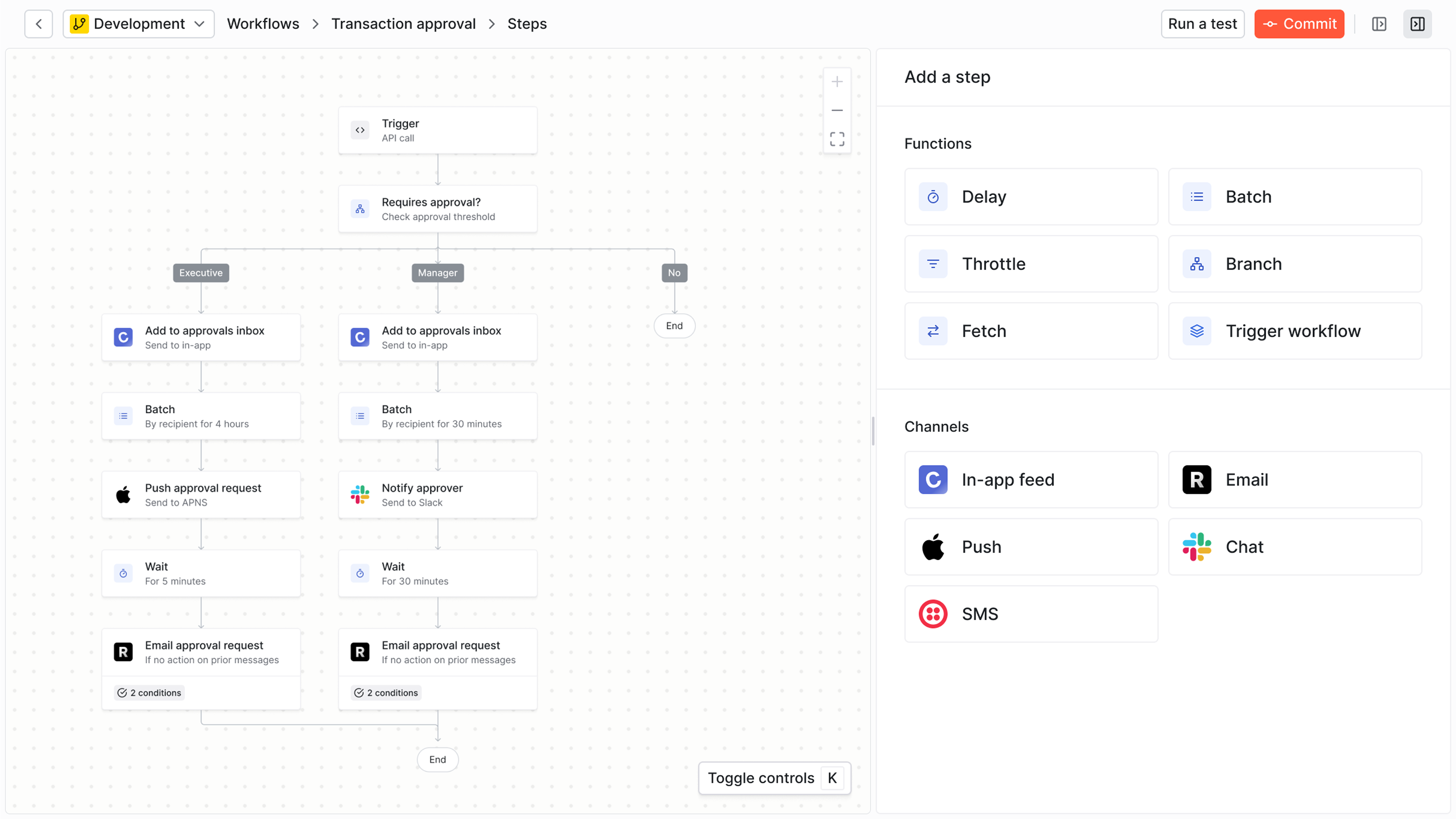
With a dedicated notification infrastructure platform, organizations can build, manage, and scale notifications across in-app, email, SMS, push, and chat apps through APIs and SDKs, and implement the system in as little as 1-3 days. Unlike marketing tools, these platforms prioritize instant delivery, developer experience, and production-grade reliability.
Customer engagement infrastructure platforms enable companies to:
- Send cross-channel notifications via API.
- Manage notification workflows programmatically.
- Scale to millions of notifications without performance degradation.
- Implement in hours instead of months.
These platforms offer a ton of advanced developer features you won’t find in marketing automation platforms:
- A production-ready, developer-friendly workflow. Product notifications are on the critical path within an application and should be a part of a team’s software development lifecycle. Transactional notification platforms provide isolated environments for dev, staging, and prod, as well as a git-like versioning workflow for pushing and rolling back changes.
- Multi-channel orchestration and preference management. Transactional notification platforms support the full breadth of channels needed for modern applications, including real-time in-app feeds as well as integrations with Slack and Teams. They also include a flexible preferences model for managing notification-specific preferences across channels, as well as more advanced use cases such as muting notifications from a specific resource in your product.
- Developer-first API and SDK support. We hear from developers that the API documentation of notification infrastructure products is stronger than that of their marketing automation counterparts, which makes sense given developers are the primary user of transactional notification platforms.
- Built-in tenancy support. Because transactional notification platforms are built for the product use case from day one, they come with a tenant model to support multi-tenant SaaS use cases such as per-account in-app feeds. These tenant models also enable you to power per-tenant branding, where a given account/customer in your product can customize your notifications with their own branding elements.
- Production-grade observability, monitoring, and analytics. Notification infrastructure products should come with better observability than you’d be able to build with an in-house notification system. At Knock, we provide a set of observability tools as well as Datadog and Segment extensions so you can monitor your notifications from the tools you use today.
- Support for batching, throttling, and more. Transactional notification platforms come with pre-built components for managing batching and digest use cases, so you don’t need to manage your own error-prone cron jobs in your own stack.
- Integrate your notification system with your CI/CD pipeline using the Knock CLI. Run notification tests, push local changes to your Knock notification system, all as part of the CI/CD actions you already run in your engineering team’s GitHub workflow.
Now, some notification infrastructure platforms fall short on supporting marketing-specific use cases, such as one-time promotional sends or the ability to build dynamic audience segments.
But some of these platforms, like Knock, support the ability to send one-time announcements across any channel and build dynamic audiences, with all of the other technical benefits of notification infrastructure layered in.
Engineers can use Knock to send complex, transactional messages and build in-app notification feeds, while marketers and PMs can build, edit, and send promotional messages and lifecycle marketing, with full product integration, advanced delivery functionalities and preference modeling, and end-to-end observability and analytics.
Determining which is right for you
Which platform fits depends less on which team owns messaging and more on what that messaging needs to do. The question to ask is whether your lifecycle campaigns depend on product data, in-product channels, and coordination with transactional messages. For most SaaS and app-based companies, they do.
Decision framework
- Where does important lifecycle data live? If campaign triggers come from product events (completed onboarding, hit a usage limit, invited a teammate), a platform that ingests those events avoids syncing product data into a separate marketing tool.
- Which channels do you send messaging on? If lifecycle journeys include in-app banners, modals, feeds, or Slack and Teams messages alongside email, SMS, and push, choose a platform that orchestrates all of them in one workflow.
- How do you measure success? If you judge campaigns by outcomes (trial conversions, upgrades, reactivation) rather than opens and clicks, look for goal tracking with attribution to each campaign.
- Who needs to manage messaging, and what safeguards do they need? Lifecycle marketers need to edit copy, audiences, and timing without engineering help. Engineers need environments, versioning, and rollback for critical notifications. A platform that offers both enables both teams to work efficiently.
- How many tools are you willing to run? Separate marketing and product messaging tools mean duplicate user data, separate preference centers, and a higher risk of over-messaging the same user.
How the two categories compare
| Considerations | Marketing automation | Customer engagement infrastructure (Knock) |
|---|---|---|
| Primary users | Marketing teams | Lifecycle marketers, product managers, and engineers, each with their own roles and permissions |
| Campaign ownership | Marketing teams build and send campaigns in a visual journey builder | Lifecycle teams build workflows, broadcasts, and in-app guides via agents or in a drag-and-drop editor; engineers manage the same resources through agents, APIs, and the CLI |
| Audience building | Dynamic segments based on stored user and company properties | Dynamic audiences based on stored user, tenant, and object properties, product events, and warehouse data |
| Outcome measurement | Campaign open and click metrics | Goals tied to events or audience membership, with completions attributed to each workflow, broadcast, and guide |
| Messaging analytics | Campaign-level engagement reporting | Step-level runs, delivery, reads, clicks, and top links, with period-over-period comparisons |
| In-product messaging | Varies; often mobile-centric and use runtime scripts that bloat app performance and break designs | Native in-app feeds, banners, modals, and toasts using your own components, triggered from the same campaign as email and push |
| Implementation time | Weeks to months | Hours to days |
| Technical expertise to run campaigns | Low | Low for day-to-day campaign work; engineering involvement for initial integration |
| Pricing model | Usually contact-based, charged on total contacts in your database | Usage-based, charged on messages sent |
| Best for | Promotional email and acquisition campaigns | Lifecycle marketing, product and transactional messaging, one-time broadcasts, and in-app messaging |
Real-world industry examples
E-commerce/marketplace
Requirement. Abandoned cart and browse reminders, promotional broadcasts, order and shipping notifications, in-app messaging
Solution. Customer engagement infrastructure, or marketing automation if promotional email is the main need
Why. If promotions and order updates should share one preference center and one user record, a single platform avoids over-messaging. Teams that send little beyond promotional email may still fit a traditional tool.
B2B SaaS
Requirement. Trial-to-paid campaigns, onboarding sequences, feature announcements, usage-limit upgrade prompts, in-app feeds, Slack notifications
Solution. Customer engagement infrastructure
Why. Campaigns trigger from product events, need in-app and Slack channels, and succeed or fail on conversion goals. Lifecycle teams own campaign content while engineers own the integration.
FinTech
Requirement. Transaction alerts, fraud notifications, payment confirmations, account balance warnings, one-time promotions, in-app notification feeds
Solution. Notification infrastructure
Why. Requires <1 second delivery for security, regulatory compliance needs, high reliability (99.99% uptime), programmatic triggering from core banking systems
Healthcare
Requirement. Appointment reminders, lab results ready, prescription refill alerts, HIPAA-compliant delivery, in-app notification feeds
Solution. Notification infrastructure
Why. Requires instant delivery for time-sensitive health info, strict compliance requirements, API integration with EMR systems, multi-channel delivery (SMS + email + in-app)
Real estate
Requirement. New listing alerts, price drop notifications, showing confirmations, offer updates, one-time sends, in-app notification feeds
Solution. Notification infrastructure
Why. Needs real-time triggers based on user preferences, complex routing rules (buyer + seller + agents), high-volume during peak hours, programmatic control
What features do you need?
| If you need… | Marketing automation | Customer engagement infrastructure (Knock) |
|---|---|---|
| Engagement analytics | Yes | Yes |
| Visual template editor | Yes | Yes |
| Visual workflow builders | Some | Yes |
| Cross-channel messaging support | Some | Yes |
| Native in-app messaging components | Some | Yes |
| API and SDK support | Some | Yes |
| Full observability (API logs, message debugging) | No | Yes |
| Advanced preference modeling | No | Yes |
| Advanced delivery functions such as batching and throttling | No | Yes |
| Multi-tenancy support | No | Yes |
| Multi-environment support | No | Yes |
| CLI and management API | No | Yes |
| Goal tracking with campaign attribution | Some | Yes |
| Step-level campaign analytics | Some | Yes |
| One campaign across email, push, SMS, and in-app | Some | Yes |
Bottom line: which platform should you choose?
Choose marketing automation if:
- Most of your messaging is promotional email to leads and prospects who are not yet product users.
- You need built-in CRM or ad retargeting features.
- Few of your campaigns depend on product events or in-app channels.
Choose customer engagement infrastructure like Knock if:
- Your lifecycle team runs onboarding, activation, upgrade, or win-back campaigns triggered by product behavior.
- You want to measure campaigns by goals such as conversions and upgrades, with attribution to each message.
- You also send transactional or product notifications and want one user record and one preference center.
- Your campaigns include in-app messages, Slack, or Teams alongside email, SMS, and push.
- Lifecycle marketers, product managers, and engineers all need to work in the same system with appropriate permissions.
Run lifecycle and product messaging with Knock
Customer engagement infrastructure like Knock gives each team what it needs in one system: APIs, environments, and versioning for engineers, visual workflow and template editors for product teams, and audiences, broadcasts, goals, and analytics for lifecycle marketers.
This approach avoids the common scenario where companies end up purchasing multiple tools (marketing automation, transactional email, in-app notifications, etc.) that don't share user data or preferences.
Starting with a platform designed for the full customer journey—rather than retrofitting a marketing tool—sets a foundation for sustainable growth and consistent user experiences.
If you want to learn more about Knock, you can sign up for a free account or chat with our team. 👋
Frequently asked questions
What's the difference between marketing automation and notification infrastructure?
Marketing automation platforms such as Braze, Iterable, and Customer.io started as tools for promotional campaigns: email newsletters, drip campaigns, and lead nurturing. Notification infrastructure started as an API layer for engineering teams to send transactional and product messages. Platforms like Knock now combine the two as customer engagement infrastructure, where lifecycle marketers build and measure campaigns and engineers integrate product messaging on the same platform.
Key differences:
- Users. Marketing automation tools target marketers. Customer engagement infrastructure like Knock serves lifecycle marketers, product managers, and engineers, with role-based permissions for each.
- Campaign building. Both offer visual editors. Knock adds API, SDK, and CLI access to the same workflows, broadcasts, and guides.
- Use cases. Marketing automation focuses on promotional campaigns. Knock covers lifecycle campaigns, announcements, in-app messaging, and transactional notifications.
- Measurement. Marketing automation reports opens and clicks per campaign. Knock adds goals with attribution to each workflow, broadcast, and guide.
- Pricing model. Contact-based vs. usage-based.
Can lifecycle marketing teams use Knock without engineering help?
Yes, for day-to-day campaign work. After engineers connect product events and user data, lifecycle marketers can build audiences, send broadcasts, edit workflows and templates in a drag-and-drop editor, launch in-app guides, set goals, and review step-level analytics from the Knock dashboard. Copy and content changes publish without a code deploy.
How do I measure lifecycle campaign performance in Knock?
Define a goal based on an event (for example, completed_onboarding) or audience membership (for example, Pro plan customers) and attach it to workflows, broadcasts, or guides. Knock attributes goal completions to each resource, and the Analytics tab shows runs, delivery, reads, clicks, and top links for every step. The Knock agent can review performance against your goals and propose experiments.
Can I use both marketing automation and notification infrastructure?
Yes, and some companies do, but running two systems means duplicate contact data, separate analytics, inconsistent user experiences, and a higher risk of over-messaging. Knock handles lifecycle, promotional, and transactional messaging in one system, so many teams consolidate onto it as they scale.
What's the implementation time for Knock?
- Basic integration. 2-4 hours (single channel, simple notifications)
- Standard implementation. 2-5 days (multi-channel, templates, preferences)
- Complete migration. 1-2 weeks (full migration from an existing system)
After the initial integration, lifecycle teams can launch new campaigns from the dashboard without additional engineering work.