At Knock, we build agentic customer engagement that identifies, builds, and ships the messaging journeys that increase user engagement and drive revenue. We're a small (but mighty) team made up of 100% technical people (myself at the bottom of that leaderboard).
Throughout my time at Knock, I can genuinely say we prioritize craft and quality, but we also ship very fast. Year to date, we've shipped 45+ changelogs, each of which I launch myself. GTM at Knock runs lean, prioritizing product improvements and customer success above all.
As the solo marketer at Knock, I cover launches, ads, social, content, website, ops, events, lifecycle marketing, and whatever else pops up. To maximize our marketing budget, we limit the amount of outside help to near-zero.
AI tooling for marketing
To help me manage all this as a one-man team, I have long leveraged AI to accelerate my work. Like many, my AI journey began with ChatGPT. I tried out Claude for more advanced work and added Cursor to update the knock.app website.
Recently, as I watched the SpaceXAI saga unfold, I decided to try out Grok Bot.
My goal? To create an agentic marketing org I can delegate work to, so I spend less time on the Small Stuff™️ so I can focus more time on the Big Stuff™️. The "small stuff" now only requires me to prompt (sometimes), review, and approve. And the Grok Bot UI makes it feel like sending a couple of texts.
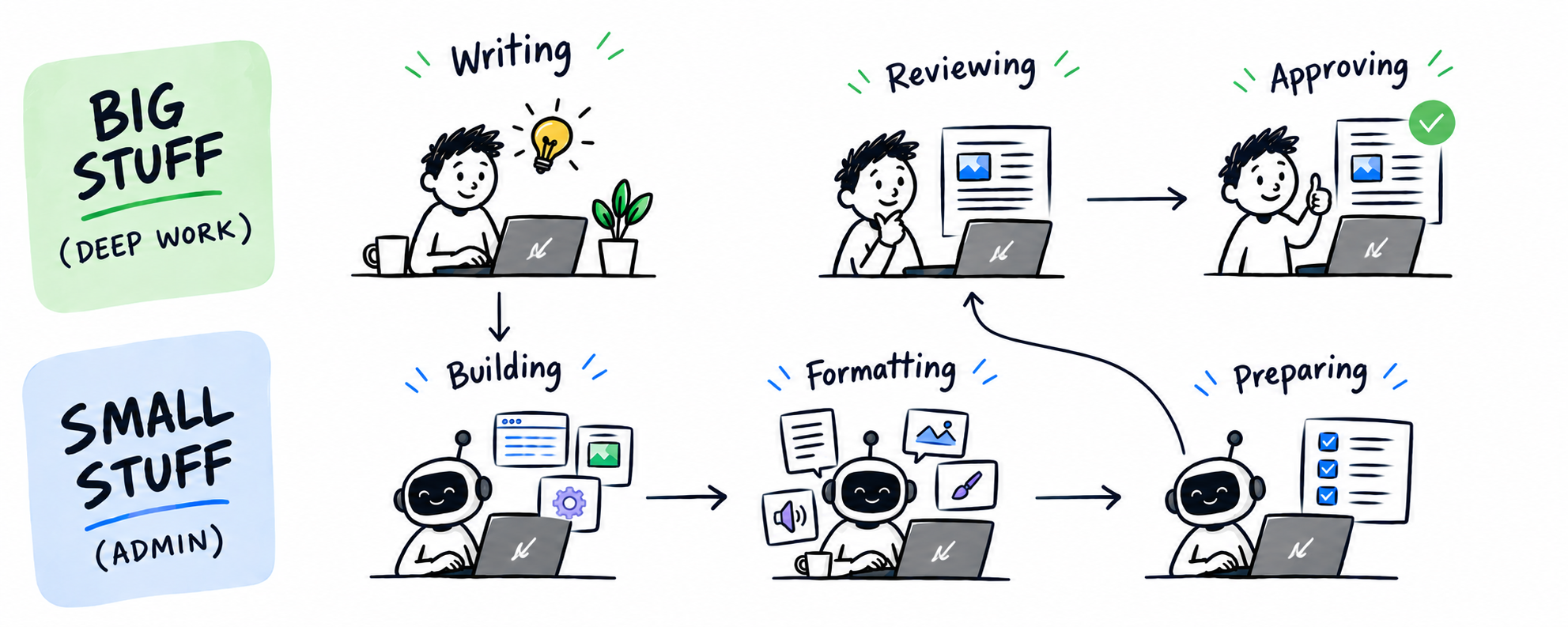
Grok Bot marketing team overview
After a solid month with my Grok Bot org, I've come close to achieving this goal. So far, it includes ~15 specialists for focused work, ~5 group chats for cross-functional work, 1 advisor to manage my bots, and 20+ integrations with other tools.
Specialist bots each own one, focused job and the tools for that job. Each bot stays in their lane, and tags in other bots to help when needed.
| Grok Bot | Role |
|---|---|
 Alfred Alfred | Designs, audits, and governs the bot org |
 Admin Bot Admin Bot | Emails, meetings, and company tasks |
 Copy Bot Copy Bot | Product positioning and marketing copy |
 Blog Bot Blog Bot | Blog ideation and drafts |
 Design Bot Design Bot | Visual mockups in Figma |
 Website Bot Website Bot | Website updates and pull requests |
 Knock Social Knock Social | Knock brand posts on LinkedIn and X |
 Sam Social Sam Social | Posts in Sam Seely's voice |
 Chris Social Chris Social | Posts in Chris Bell's voice |
 Scott Social Scott Social | Posts in my voice |
 Intel Bot Intel Bot | Competitor tracking and social listening |
 Google Ads Google Ads | Google Ads performance and recommendations |
 LinkedIn Ads LinkedIn Ads | LinkedIn Ads performance and recommendations |
 X Ads X Ads | X Ads performance and recommendations |
 Reddit Ads Reddit Ads | Reddit Ads performance and recommendations |
 Knock Bot Knock Bot | Customer and lifecycle messaging |
 Events Bot Events Bot | In-person event planning |
 Webinar Bot Webinar Bot | Virtual event planning |
 SEO Bot SEO Bot | SEO and AEO gap finding |
 Outbound Bot Outbound Bot | Outbound campaigns |
Group chats are collections of these specialist bots that work together. Ads Bot, Social Bot, and Changelog Bot are rooms made up of the right specialists when a job spans more than one bot. The work still lives with the specialists in their chats, but they all report into the group chat when pinged there.
| Group chat | Role |
|---|---|
| Ads Bot | Manage paid ads; members include Google Ads, LinkedIn Ads, X Ads, and Reddit Ads |
| Social Bot | Draft and schedule social posts; members include Knock Social, Sam Social, Chris Social, Scott Social, and Intel Bot |
| Changelog Bot | Coordinate product launches; members include Copy Bot, Design Bot, Website Bot, Social Bot, and Knock Bot |
These Grok Bots can access relevant plugins with our existing tech stack, including Linear, PostHog, Notion, Slack, Ordinal, GitHub, Vercel, Figma, Clay, Ramp, Granola, Gmail, GCal, and more.
Admin tasks
First off, a simple one, so I'll keep it brief. Admin Bot is my personal assistant that helps me manage my emails, meetings, and random company tasks so I can stay focused on work that moves the needle.
Content + positioning
Copy Bot handles product positioning and marketing copy. It leverages Knock's brand, tone, and voice guidelines (stored in Notion) to create copy that sounds like us and resonates with our target audience. Helps with everything from website pages to product announcements to ad copy.
Blog Bot ideates and drafts blog posts for knock.app/blog based on existing posts and our writing guidelines (stored in Notion), which helps reduce the amount of work I have to do when I get the draft. It also applies SEO and AEO best practices to all its work, ensuring every blog will actually drive traffic.
Design
Design Bot is the creative on the bench, helping me turn ideas into visual mockups in Figma. I often work with this bot on a one-off request basis, when I need an image for a blog, changelog, ad, or social post.
Website + coding
I use Website Bot to create PRs on our marketing-site GitHub repo. This bot makes changing a headline, publishing a blog, or launching a new landing page a breeze. I simply prompt it with some details, it goes to work, and provides a link to the PR, with a Vercel preview link, moments later. I can then request changes directly or tell it to ask others for approvals.
It natively leverages Cursor to ship the code associated with my requests, and I can always open the Cursor session if I'd like to see more details.
Social media
When it comes to social media, there's a lot of pieces that can be automated, but voice is one of the trickiest to get right. A cofounder post that sounds like a brand account fails, just like a brand post that sounds like a personal rant fails, too.
For this reason, I created several bots that write LinkedIn and X posts in different voices, using each profile's existing posts and Slack communications as reference.
Knock Social drafts posts for Knock's LinkedIn + X company accounts using Knock's brand writing guidelines. Sam Social, Chris Social, and Scott Social draft on-brand posts for Sam Seely (CEO + Co-founder), Chris Bell (CTO + Co-founder), and me (Growth Lead).
Then, Social Bot is the group chat for all of these bots, so I can go to one place to draft new posts for all of us to share.
Once drafted, Social Bot also handles formatting (like tagging profiles), moves the drafts to our social management tool, Ordinal, and requests approval from the owner.
Each of us gets a notification with a link to review, make changes, and schedule as we see fit.
Competitive + social listening
Intel Bot tracks competitor pricing, product, and hiring pages and sends me a daily digest of any notable changes. It also watches Reddit, Hacker News, news sites, and X for third-party mentions of Knock or our competitors.
If there's nothing worth noting, it stays quiet, but otherwise it covers "what changed in the market" and "what people are saying" without me having to open twenty tabs on a daily basis.
Paid ads
Ads Bot is the group chat for the bots that manage each channel Knock runs ads on: Google Ads, LinkedIn Ads, X Ads, and Reddit Ads.
Each of them can pull campaign data from Knock's ad accounts, summarize performance, recommend where to move budget, and suggest updates to keywords, ads, and landing pages. The only thing it can't do is publish anything without my express permission.
I use this room to ask questions and review suggestions across paid channels. What's nice about this chat having context across all platforms is that it can recommend shifting budget between them, instead of just making changes in silos.
Customer + lifecycle messaging
Knock Bot is tightly integrated into Knock using the native Grok Bot connector, and handles all of our customer and lifecycle messaging. It can build and manage messaging workflows, draft and schedule one-time email sends, and publish targeted in-app messages.
I use this bot to launch in-app announcements when a new changelog ships, automatically draft our monthly newsletters, and get a weekly performance digest of our lifecycle campaigns across email, in-app, push, and SMS.
Product launches
Changelog Bot is the group chat I use for product launches. It includes Copy Bot (to write the announcement), Design Bot (to create the cover image), Website Bot (to publish the changelog post), Knock Bot (to build the messaging), and Social Bot (to draft social posts for Knock, Sam, Chris, and myself).
This group chat keeps everything I need for a product launch in one thread, and makes it easy to review and approve.
Events + webinars
Events Bot is my assistant for planning in-person events. It helps me brainstorm, creates checklists + timelines, and helps me manage communciations with vendors, venues, and speakers. I explain all of our events and it reminds me of the work that has to happen leading up to show day.
Webinar Bot helps me manage our virtual events. It's more focused on topic ideation, speaker recruitment, content planning, and various logisitics. It tags in Copy Bot, Social Bot, and Knock Bot when it's time to promote the session.
Alfred: design, audit, and govern
Finally, we have Alfred, our Chief Bot Advisor. He designs, audits, and governs my Grok Bot org to fit my needs and prevent bot sprawl.
His contribution comes in the form of a weekly summary where he might suggest creating a new group chat for a common use case, adding a new weekly routine, or removing a Grok Bot if it hasn't been used in a few weeks.
More coverage, same headcount
After building this Grok Bot org, my AI usage has shifted from asking ChatGPT questions to proactively delegating work to the bot best suited for it.
In motion, it can look like:
- Intel Bot flags a relevant X post, and Sam Social drafts a tasteful reply in Sam's voice.
- Ads Bot analyzes last week's performance and recommends shifting budget from a weak LinkedIn campaign to our Google Ads campaign. I approve or reject the change.
- Knock Bot summarizes the performance of our lifecycle campaigns from last week and identifies an opportunity to improve engagement.
- Intel Bot alerts our
#competitionSlack channel of a competitor pricing change. - SEO Bot identifies an SEO + AEO gap and Blog Bot drafts a full, on-brand blog post to close it.
- Events Bot proactively reminds me to reach out to the venue about placing a food order.
This setup increases my coverage across all of the marketing surfaces that would usually take a much larger marketing team to manage. The bots keep context, data, and tools straight and bring me in for review and approvals.
Leveraging agents to run marketing
This Grok Bot setup works because it's connected to the tools needed to actually complete the work: ad platforms, social media accounts, and company tools. While AI integrations aren't new, bots having access to a virtual computer unlocks a lot, especially for less technical folk. You can bet that this is where all AI companies are heading (no, I haven't tried Muse yet).
We're building Knock in the same way. We're one of the few customer engagement platforms where you can connect your marketing tools, messaging providers, and data warehouse and manage all your transactional, promotional, and lifecycle messaging via agents.
All it takes it a prompt to build workflows, schedule one-time emails, publish in-app messages, and run lifecycle campaigns across email, in-app, push, and SMS.
If you want to try Knock, sign up for a free account or chat with our team today.